
The fastest way to improve email writing is deliberate, feedback-led practice, not writing more emails on autopilot. Run short exercises tied to your actual inbox, get AI feedback on tone and clarity, then revise by hand. Add one habit on top of that: apply a short checklist (subject-first, front-loaded message, explicit action) every time you hit send.
TL;DR:
- Focused, feedback-driven practice with AI significantly improves grammar and cohesion, especially when performed consistently over two weeks.
- Using a quick pre-send checklist ensures email clarity by front-loading the message, making actions explicit, and formatting for skimming.
- Practice should target specific skills like tone or subject lines through short, real-inbox exercises rather than long, unfocused writing sessions.
- AI feedback works best when prompts are specific, and users actively accept, adapt, or reject suggestions based on relationship context.
- Tracking measurable improvements such as error reduction and response rates helps gauge progress, avoiding reliance on confidence alone.
Table of Contents
- Why Deliberate Practice Plus AI Feedback Works
- A Checklist to Run Before Every Send
- A Two-Week Micro-Practice Plan for Busy Professionals
- How to Get Useful Feedback From AI Without Losing Your Voice
- Common Email Writing Mistakes to Avoid
- Before-and-After: What Improvement Actually Looks Like
- Recommended AI Tools and Platforms for Email Feedback
- What I've Learned About Practice, Patience, and Progress
- How EmailBetter Fits Into This Routine
- Authoritative Studies and Practical Resources
- Sources
- FAQ
Why Deliberate Practice Plus AI Feedback Works
Writing more emails does not make you a better writer. What builds the skill is deliberate practice: short, targeted repetitions aimed at one weakness, followed by feedback you can act on immediately. Writing coaches Jules Horne and Barbara Baig have both argued that this kind of focused, feedback-driven repetition beats "naive practice," where you just produce more text without a specific goal. Sending fifty emails a week teaches you almost nothing if none of them come back corrected.
AI feedback closes that gap for people who don't have an editor reading over their shoulder. A controlled study from the first quarter of 2026 found that learners using AI-generated feedback improved grammar by 43.5%, vocabulary by 37.3%, cohesion by 49.5%, and overall writing quality by 37.8%. Those are not small effects for a few weeks of practice.
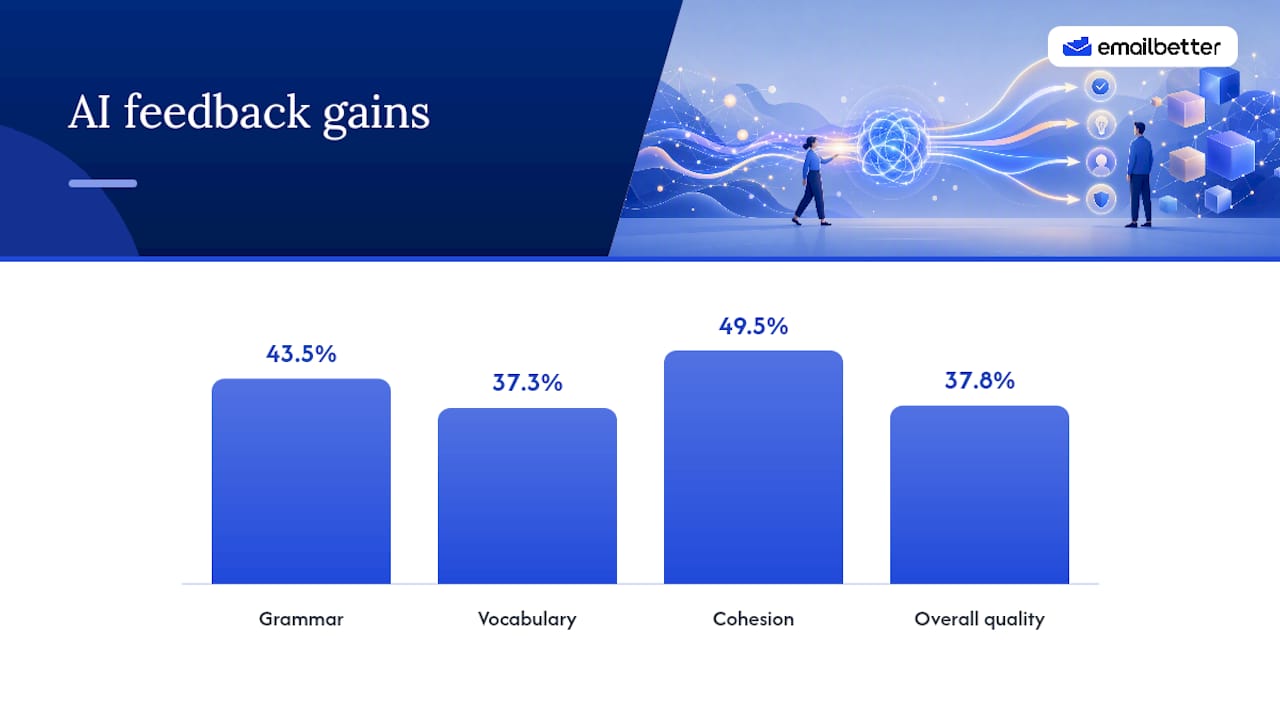
A separate 2026 meta-analysis backs this up at a broader scale, reporting that feedback-generating AI tools produce an effect size of g = 1.708 for productive skills like writing, one of the largest gains recorded for any skill category the researchers reviewed. The catch: the researchers stress that the gains depend on consistent, guided interaction, not a one-off correction.
What this means in practice:
- Immediate feedback shortens the loop between mistake and correction, so bad habits get caught before they calcify.
- Repetition on a narrow skill (subject lines, action lines, tone) builds pattern recognition faster than general writing volume.
- AI feedback gives non-native speakers a private, judgment-free way to test drafts before they reach a colleague's inbox.
A Checklist to Run Before Every Send
Most email problems trace back to five or six repeatable mistakes. Running through this checklist takes under a minute once it becomes habit, and it fixes the issues that actually slow readers down or get emails ignored.
- Write the subject line last. Draft the email first, then summarize the outcome in the subject. Keep it brief and make it action-bearing: "Approve Q3 budget by Friday" beats "Budget question."
- Front-load the first sentence. State the decision, request, or update immediately. Readers scan the first line to decide whether the rest matters, and workplace-writing research on the email triangle treats the subject and opening sentence as the real message, with everything else as support.
- Make the action explicit. Pair a verb with a deadline or concrete next step: "Send the revised deck by 3 PM Thursday," not "Let me know when you can."
- Format for skimming. Short paragraphs, numbered lists for multiple asks, and bold used only where it changes what the reader does next.
- Calibrate tone to the recipient. Match formality to the relationship, and add one short warmth line when you're writing to someone you'll need again.
- Run final checks. Attachments present, names and titles spelled correctly, no stray recipients on CC, links tested. University guidance on professional email writing flags reply-all hygiene and correct salutations as small details that quietly damage credibility when ignored.
Pro Tip: Draft the whole email before touching the subject line. Writing the subject first almost always produces a vague label instead of a specific promise.
A Two-Week Micro-Practice Plan for Busy Professionals
You don't need an hour a day. Five to ten minutes, spent on one narrow skill, produces measurable change faster than occasional long sessions, which is the same principle behind tiny-habit and deliberate-practice routines built for people with no spare time.
Run this daily session:
- Pick one real email from your inbox that needs a reply, or use a seeded practice prompt.
- Draft or rewrite it in under five minutes, focused on a single element (subject line, front-loading, tone, or the action ask).
- Run it through AI feedback and read every suggestion.
- Revise the draft and log two specific changes you made.
Track one metric per week rather than trying to measure everything at once:
- Number of grammar or clarity errors flagged by feedback, tracked weekly to see the count drop.
- Time it takes you to get to the actual point in your own draft.
- Response rate on real emails, where you can reasonably track it.
The deliberate-practice principle that matters most here is working in the uncomfortable zone: pick the one element you're weakest at, and push there instead of polishing what's already fine. After two weeks, extend sessions to 10 to 20 minutes and start rotating between multiple skills instead of one. Prebuilt exercises with sample answers give you seeded prompts for days when your own inbox doesn't offer a good practice case.
How to Get Useful Feedback From AI Without Losing Your Voice
Generic prompts produce generic feedback. Ask AI feedback tools to check something specific: "Is this tone too casual for a client?" or "Rewrite my action line to be more direct" gets you a usable answer. "Fix this" gets you a rewritten email that may not sound like you anymore.
Treat every suggestion as one of three things: accept it outright, adapt it to your own phrasing, or reject it because it doesn't fit the relationship or context. The strongest workflow follows a fixed order: draft, get AI feedback, apply concrete edits, then do a human spot-check for anything emotionally sensitive or politically loaded. Research comparing AI and human feedback finds they play complementary roles: AI catches grammar and clarity issues instantly and consistently, while a human colleague still reads interpersonal nuance better, especially for a message to your boss or an upset client.
A few habits keep this workflow safe:
- Verify factual claims and figures yourself; AI feedback checks writing quality, not accuracy.
- Double check attachments and links before sending, since feedback tools don't see what's attached.
- Never paste confidential client or company information into a third-party AI tool unless your company's policy explicitly allows it.
Pro Tip: When AI suggests a more formal rewrite, ask yourself if the relationship supports that formality. Overcorrecting toward stiffness is nearly as common a mistake as being too casual.
Common Email Writing Mistakes to Avoid
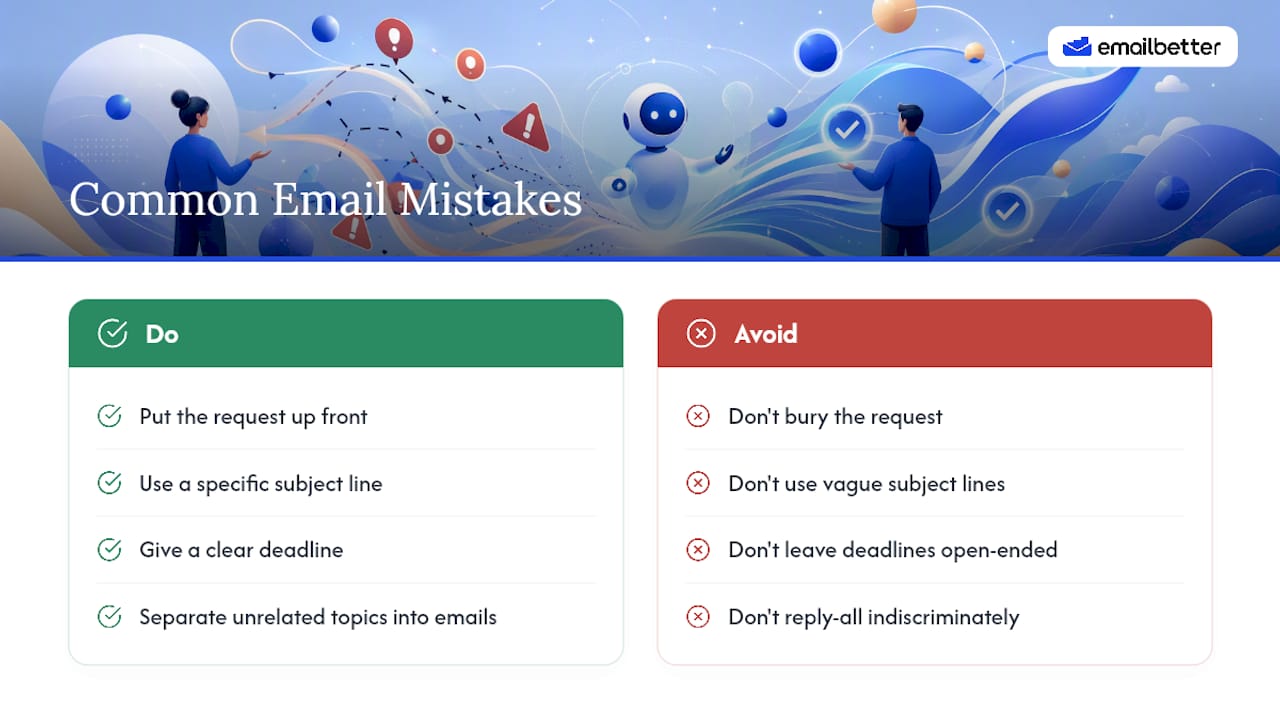
Most professionals repeat the same handful of errors, and they're easy to spot once you know what to look for.
Burying the request. A three-paragraph setup before the actual ask means busy recipients skim past it, or miss it entirely.
Vague subject lines. "Quick question" or "Update" tells the reader nothing about urgency or content, so it sits unopened.
Passive asks with no deadline. "Whenever you get a chance" invites indefinite delay. State a specific date or time.
Overloading one email with multiple unrelated topics. Readers respond to the easiest item and ignore the rest. Split unrelated requests into separate messages.
Tone mismatches. Overly casual language with a client, or unnecessarily stiff language with a close colleague, both create friction that has nothing to do with content.
Reply-all sprawl. CC lists that grow with every reply clutter inboxes and blur accountability for who's actually responsible for the next step.
Skipping the final read-through. Wrong attachment, misspelled name, or a broken link undoes an otherwise well-written message in seconds.
Each of these traces back to skipping a step in the checklist above, which is exactly why the checklist works as a habit rather than a one-time fix.
Before-and-After: What Improvement Actually Looks Like
Seeing a revision side by side makes the checklist concrete.
Before: "Hi, I wanted to reach out about the report we discussed last week. I was thinking maybe we could talk about it sometime this week if you have time, let me know what works."
After: "Subject: Q3 Report Review, Need Your Sign-Off by Thursday. Hi Maria, Can you review the attached Q3 report and confirm by Thursday at noon? I've flagged two sections in the doc that need your input."
The second version front-loads the decision, states a deadline, and points to exactly what needs attention. It's shorter and does more work.
Before: "I noticed there might be an issue with the numbers in the spreadsheet, not totally sure but wanted to mention it just in case."
After: "The revenue total on row 14 doesn't match the source data. Can you confirm which figure is correct before I forward this to finance?"
The revised version removes hedging language, states the specific problem, and asks a direct question with a clear next step. Reworking real messages like these, the way correction and clarification templates model, trains you to spot vague hedging in your own drafts before you send them.
Recommended AI Tools and Platforms for Email Feedback
Not every AI writing tool gives useful feedback on emails specifically. General-purpose chatbots can rewrite a message, but that's a different job from teaching you to write better yourself, and it doesn't build the skill you're trying to improve.
Look for a few specific things when choosing a feedback tool: it should assess tone, clarity, and professionalism separately rather than giving one vague score, it should work from real inbox scenarios instead of generic prompts, and it should give you suggestions you apply yourself rather than a finished replacement message. EmailBetter was built around exactly that distinction: exercises pull from real workplace scenarios, and the AI feedback breaks down tone, clarity, and professionalism as separate dimensions so you know precisely what to fix.
For non-native English speakers specifically, feedback that flags patterns tied to translation habits (literal phrasing, unnecessary hedging, formality mismatches) matters more than generic grammar correction. Grammar checkers built for native speakers often miss these patterns entirely because they're not grammatically wrong, just stylistically off for a professional register. That's a different failure mode than a typo, and it needs a tool built to catch it.
What I've Learned About Practice, Patience, and Progress
Most people quit a practice routine before it produces visible change, because they're judging progress by how confident a draft feels rather than by what actually changed. Confidence lags skill. Track two or three specific edits per session instead of trusting your gut, and give it two full weeks before deciding whether the method works. The habit that compounds isn't writing more. It's writing less, more carefully, with someone (or something) checking your blind spots every time.
— Henrique
How EmailBetter Fits Into This Routine
This platform is built for exactly the workflow this guide describes: short, real-inbox exercises instead of generic writing prompts, with AI feedback that scores tone, clarity, and professionalism separately so you know exactly what to revise.
The exercises pull from actual workplace scenarios across different industries, so practicing feels closer to answering your real inbox than completing a generic worksheet. Each exercise comes with sample answers and templates you can compare your draft against, which gives you the concrete before-and-after reference point that makes progress visible instead of assumed.
If you're seeking measurable, structured practice rather than vague advice about "writing more," a short daily cycle on a suitable platform builds the habit this article outlines without eating your afternoon. Start with a free practice exercise and run one real email from your inbox through it today, then compare the AI feedback against the checklist above.
Authoritative Studies and Practical Resources
- Beyond red ink: AI feedback and ESL academic writing development, the Q1 2026 controlled study behind the grammar and cohesion figures above.
- Meta-analysis on AI-supported feedback effectiveness, covering effect sizes across skill types.
- PLOS ONE study on generative AI feedback and self-regulated learning.
Sources
- Beyond red ink: AI feedback and ESL academic writing development in higher education | Language Testing in Asia | Springer Nature Link
- Meta-analysis on AI-supported feedback effectiveness (Springer, 2026)
- PLOS ONE study on generative AI feedback and self-regulated learning
FAQ
How fast will I see improvement in my email writing?
Studies on AI feedback show measurable gains, including a 37.8% improvement in overall writing quality, within a matter of weeks when practice is consistent and focused, not months of passive writing.
Is it safe to send work emails to AI feedback tools?
Only send content you're allowed to share under your company's data policy. Avoid pasting confidential client details, financial figures, or personal information into any third-party AI tool unless your organization has explicitly approved it.
Should non-native English speakers prioritize grammar or tone first?
Tone and clarity usually matter more day to day, since a grammatically perfect email with the wrong register can still damage a professional relationship, while a slightly imperfect but clear, well-toned message rarely does.
Are templates enough, or do I need to practice?
Templates show you the target, but they don't build the skill. Practicing with real drafts and getting feedback, the way EmailBetter's exercises structure it, is what actually transfers to your own inbox.
What's the single highest-leverage change I can make right now?
Front-load your message: state the decision or request in the first sentence, and write the subject line last so it reflects the actual outcome, not a vague topic label.