
The most effective payment reminder email is short, specific, and timed to a schedule rather than sent in a panic. Name the invoice number, the exact amount, the due date, and a direct payment link, then follow a five-touch cadence that starts before the due date and escalates gradually. The pattern below reflects what consistently gets invoices paid without damaging the relationship.
TL;DR:
- Sending a five-stage reminder sequence over 14 to 30 days boosts payment recovery, with the highest success on the due date email.
- Include the invoice number, due date, exact amount, and a direct payment link in every reminder, matching tone to the overdue stage.
- Use clear, specific subject lines that reflect urgency, such as "14 days overdue," to improve open rates and response likelihood.
- Automated email chains with decline reason segmentation perform better, especially when combined with human follow-up at later overdue stages.
- Practicing and testing email tone through AI-based inbox simulations can help ensure prompts are professional, confident, and appropriate to relationships.
Table of Contents
- What's the Best Payment Reminder Email Cadence?
- What Should Every Payment Reminder Include?
- Copy-Ready Payment Reminder Templates for Every Stage
- How to Write Subject Lines and CTAs That Get Opened
- How Do You Automate and Track Payment Reminders?
- Who's Behind This Cadence, and How to Practice It
- Freelancer or Small Business: Which Cadence Fits You?
- Practice Your Payment Reminder Emails Before You Send Them
- Sources
- FAQ
What's the Best Payment Reminder Email Cadence?
Timing decides whether a payment reminder email gets read or ignored. A single reminder sent after an invoice goes overdue is a weak strategy on its own. A dunning sequence of five or more emails spread across 14 to 30 days performs far better, because each message targets a different psychological moment: the "don't forget" nudge, the "it's due today" prompt, and the escalating "this is now a problem" stages.
Here's the cadence that works for most invoicing situations:
- 7 days before due: A friendly heads-up that the invoice is coming due, with the amount and link included.
- Due date: A same-day reminder confirming the invoice is due today.
- 3 days overdue: A polite nudge assuming an oversight, not bad faith.
- 7 to 14 days overdue: A firmer message that may include a payment plan offer.
- 30 days overdue (final notice): A formal message stating next steps, and possibly late fees.
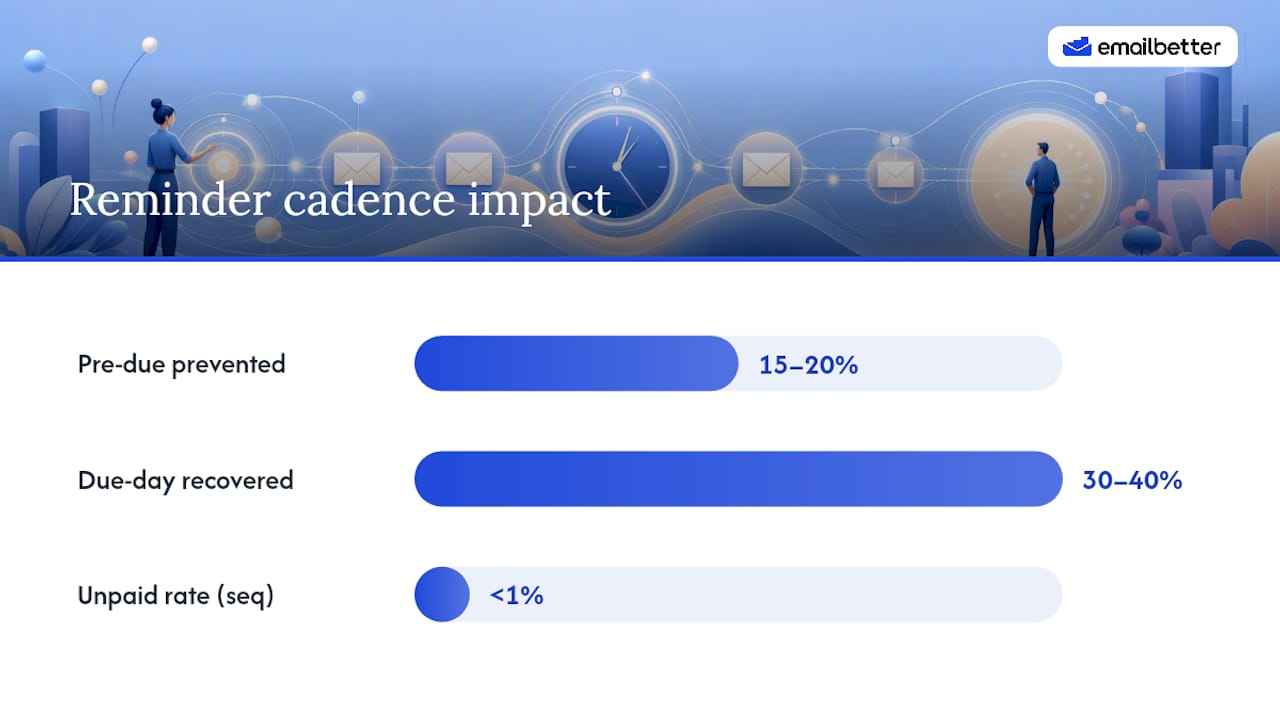
The numbers behind this schedule are worth knowing. Pre-due reminders prevent 15 to 20% of payment failures before they even happen, and the day-of reminder alone recovers 30 to 40% of payments that would otherwise fail. That single email, sent on the due date, does more work than almost anything that follows it.
Failed payments aren't a minor inconvenience. The subscription industry alone lost a reported $129 billion in 2025 to failed and unrecovered payments, and businesses running a structured, automated sequence tend to keep unpaid invoice rates under 1%. That gap between "we send one reminder eventually" and "we run a real sequence" is the gap between chasing money and getting it.
If you're a freelancer with a handful of ongoing clients, you can compress this cadence slightly and add more personal touches, since you likely know the person on the other end. Subscription businesses with hundreds of accounts need the opposite: heavier automation, decline-reason segmentation, and a human touch reserved for the later stages where it counts most.
What Should Every Payment Reminder Include?
A payment reminder email either gets acted on in ten seconds or gets buried in someone's inbox for a week. The difference usually comes down to four fields and a short body.
Every reminder needs:
- Invoice number so the recipient (or their accounts team) can find the record instantly.
- Exact due date, stated plainly, not buried in a paragraph.
- Precise amount owed, including currency, with no rounding.
- A direct, one-click payment link that skips the login-and-search routine.
Keep the body to about three sentences. Recipients skim invoices; they don't read them. A reminder that opens with three paragraphs of context before mentioning the amount owed loses the reader before it makes its point. State the fact, state the ask, provide the link.
Reattaching the invoice PDF matters more than most people assume. It eliminates the most common stalling excuse in accounts payable: "I never received it." Pairing the attachment with a payment link removes both friction points at once, since the recipient doesn't need to dig through old email threads to act.
Subject lines should scale with urgency. A pre-due reminder can stay soft ("Invoice #1042 due next week"), while anything past 14 days overdue should say so directly ("Invoice #1042: 14 days overdue"). Burying the word "overdue" to sound polite usually backfires. It reads as vague instead of considerate, and vague subject lines get lower open rates than direct ones.
Pro Tip: Don't apologize for asking to be paid for work you already delivered. A neutral, factual tone reads as more professional than an apologetic one, and it signals that the request is routine, not awkward.
Copy-Ready Payment Reminder Templates for Every Stage
Below are seven templates mapped directly to the cadence described earlier. Swap in your own invoice details, and adjust the tone note if your relationship with the client calls for something warmer or more formal.
1. Seven days before due (friendly, pre-due)
Subject line options: "Invoice #[number] due next week" or "Quick heads-up: payment due [date]"
Hi [Name],
Just a quick note that invoice #[number] for $[amount] is due on [date]. You can pay directly here: [payment link]. Let me know if you have any questions.
Thanks, [Your name]
Tone: friendly. CTA button wording: "Pay Invoice Now." Personalization token: first name, project or service reference.
2. Due date (neutral, factual)
Subject line options: "Invoice #[number] is due today" or "Payment due today: invoice #[number]"
Hi [Name],
Invoice #[number] for $[amount] is due today. Here's the payment link for your convenience: [payment link]. Reach out if anything's holding this up.
Best, [Your name]
Tone: still friendly, slightly more direct. This is the email that recovers the highest share of otherwise-missed payments, so keep it simple and don't skip it.
3. Three days overdue (friendly reminder)
Subject line options: "Invoice #[number] is now overdue" or "Following up on invoice #[number]"
Hi [Name],
Invoice #[number] for $[amount] was due on [date] and appears to still be outstanding. This sometimes happens with a full inbox, so I wanted to flag it directly. You can pay here: [payment link].
Thanks, [Your name]
Tone: friendly, assumes good faith. This is the message where an "options I haven't mentioned" line can help. Adding something like "if timing is tight, let me know and we can work something out" reopens the conversation instead of forcing a binary pay-or-ignore response.
4. Seven days overdue (firmer)
Subject line options: "Invoice #[number]: 7 days overdue" or "Please settle invoice #[number]"
Hi [Name],
Invoice #[number] for $[amount] is now 7 days past its due date of [date]. I've attached the invoice again for reference, and you can pay directly here: [payment link]. Please let me know if there's an issue on your end.
[Your name]
Tone: firm, not aggressive. Reattaching the invoice at this stage removes any lingering excuse about a missing email.
5. Fourteen days overdue (payment plan offer)
Subject line options: "Invoice #[number]: let's find a way forward" or "Overdue invoice #[number]: options available"
Hi [Name],
Invoice #[number] for $[amount] is now two weeks past due. I understand cash flow can be tight, so if a split payment or short extension would help, I'm open to discussing it. Otherwise, you can settle the full amount here: [payment link].
[Your name]
Tone: pragmatic. This is the stage where offering flexibility, rather than pressure, tends to produce a reply. A named, human sender at this point recovers more than a generic accounts inbox.
6. Thirty days overdue (formal notice)
Subject line options: "Invoice #[number]: 30 days overdue, formal notice" or "Action required: invoice #[number]"
Dear [Name],
This is a formal notice that invoice #[number] for $[amount], originally due [date], remains unpaid after 30 days. now applies per our agreement.] Please remit payment within 5 business days using this link: [payment link], or contact me directly to discuss the account.
Regards, [Your name / Company name]
Tone: formal. Stripe recommends stating late fees explicitly when they apply, rather than implying them, and offering a clear deadline for response.
7. Final notice / escalation
Subject line options: "Final notice: invoice #[number]" or "Invoice #[number]: final reminder before escalation"
Dear [Name],
Despite previous reminders sent on [dates], invoice #[number] for $[amount] remains unpaid. This is a final notice before we escalate this matter [to collections / to legal review, as applicable]. Please pay in full within [X] days using this link: [payment link], or contact me immediately to resolve this.
[Your name / Company name]
Tone: formal, unemotional. Summarize prior contact dates in this message. If the account ever needs escalation beyond email, that record supports the next step.
How to Write Subject Lines and CTAs That Get Opened
Subject lines carry more weight than most senders give them credit for. A vague one gets skipped in a crowded inbox; a specific one gets opened out of simple curiosity or urgency.
Ten subject lines worth testing across your sequence:
- "Invoice #1042 due next week" (clear, low pressure)
- "Payment due today for invoice #1042" (urgency without alarm)
- "Quick reminder: invoice #1042" (soft, casual tone)
- "Invoice #1042 is now overdue" (direct, factual)
- "Following up on invoice #1042" (neutral, assumes oversight)
- "Invoice #1042: 14 days overdue" (specific overdue count builds urgency)
- "Let's resolve invoice #1042 together" (collaborative framing for payment-plan stage)
- "Action needed: invoice #1042" (formal but not threatening)
- "Final notice: invoice #1042" (unmistakable at the last stage)
- "Invoice #1042: please review" (works well when reopening a stalled thread)
CTA buttons should say exactly what happens next. "Pay Invoice Now" outperforms a generic "Click Here" because it removes any ambiguity about what the link does. On mobile, where a large share of these emails get opened first, a large tappable button beats a text link buried in a paragraph.
Two easy tests to run this week: first, send the same overdue reminder to two similar clients with different subject lines (one soft, one direct) and compare open rates. Second, test a text-link CTA against a button CTA on your day-of reminder and compare click-to-pay rates. Two weeks of data will tell you more than any general rule.
How Do You Automate and Track Payment Reminders?
Manual reminders don't scale past a handful of clients, and even at small scale they're easy to forget. Most invoicing platforms let you wire up a simple chain: invoice created, due date set, automated email triggered at each cadence stage, payment link embedded automatically.
Once automation is running, three metrics tell you whether it's working:
- Open rate: low open rates often point to subject-line problems or a sender address that looks unfamiliar.
- Click-to-pay rate: measures whether the email itself, not just the subject line, is convincing people to act.
- Recovery rate: the real bottom line, tracking what percentage of overdue invoices eventually get paid through the sequence.
If recovery rate stalls after the 14-day stage despite decent open and click rates, that's the signal to move from automated emails to a direct, human message rather than another templated send.
Deliverability matters more than most senders realize. Use a real reply-to address, not a no-reply inbox, since a dead-end address discourages replies and can hurt sender reputation over time. Avoid spam-trigger language like "URGENT" in all caps or excessive exclamation points. Send windows matter too: mid-morning on a weekday tends to align best with when accounts-payable teams are actually processing email, while late Friday afternoons and Monday mornings tend to get buried under the weekend backlog.
Pro Tip: If your payment processor provides decline codes, segment your dunning messages by reason. An expired-card message and an insufficient-funds message should point to different next steps, not the same generic "please update your payment method" line.
Who's Behind This Cadence, and How to Practice It
This cadence and template set reflects practical teaching work by Henrique at EmailBetter, built around a simple idea: professionals don't need more theory about tone, they need reps. EmailBetter's polite reminder email guidance and follow-up templates cover adjacent scenarios, from gentle nudges to firmer follow-ups after silence.
Writing a payment reminder is a specific skill, distinct from general business writing. It requires being direct about money without sounding hostile, and firm without sounding desperate. That balance is hard to hit on the first try, especially for non-native English speakers translating a tone they'd use comfortably in their own language into English phrasing that can land as either too soft or too blunt.
Practice scenarios simulate exactly this kind of exchange from inside a real inbox interface, and an AI feedback system evaluates tone, clarity, and professionalism on each draft. You can run a payment reminder scenario, tighten the opening sentence, test a firmer subject line, and adjust your CTA wording, all with feedback on whether the message reads as confident or confrontational before it ever reaches a real client.
Freelancer or Small Business: Which Cadence Fits You?
Freelancers and small agencies chasing payment from a handful of known clients can afford a more personal cadence. Skip the fully automated tone at every stage. Add a first-name reference to the project, mention the specific work delivered, and consider offering a payment plan earlier, around day 7 rather than day 14, since preserving the relationship usually matters more than strict process. Pause new work for a client only after the 14-day stage, and always confirm that pause in writing so there's no ambiguity later.
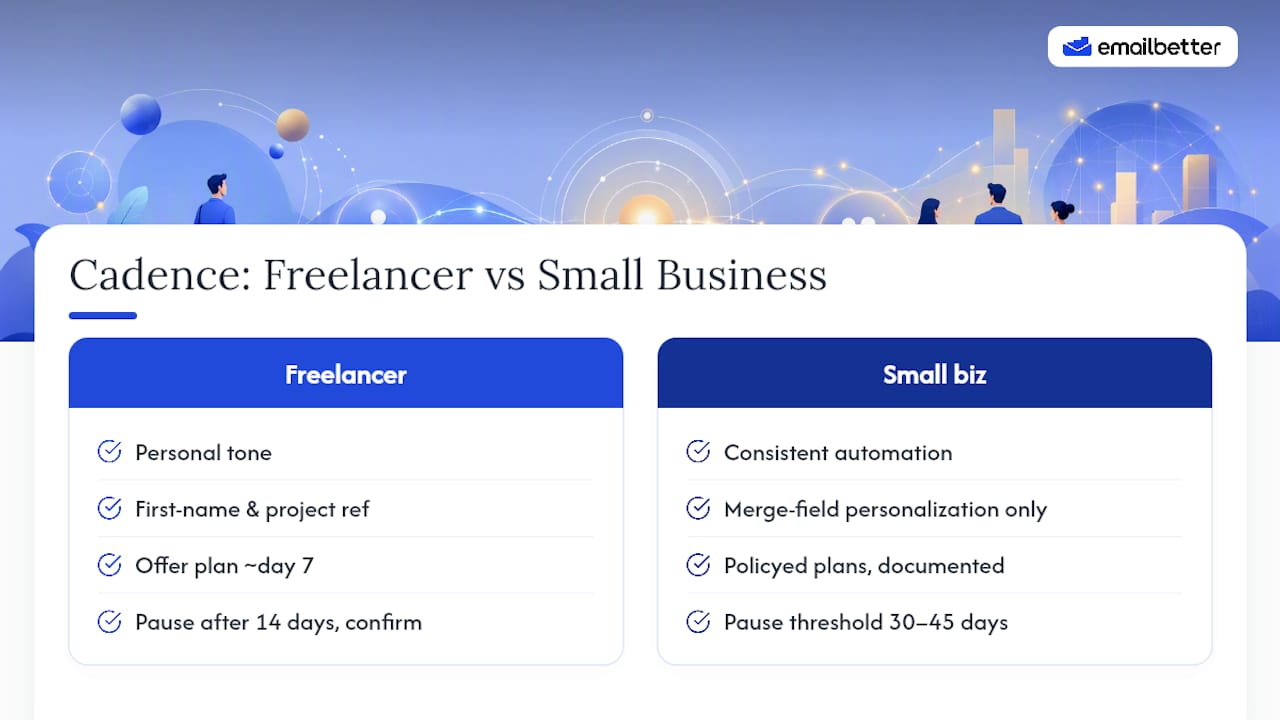
Small businesses managing dozens of accounts need the opposite emphasis: consistent automation across every stage, decline-reason segmentation where possible, and personalization limited to merge fields rather than hand-written notes. Reserve human, named-sender contact for the 14-day and 30-day stages, where it recovers meaningfully more than another templated send. Offer payment plans as a documented policy rather than a case-by-case decision, and set a firm, written threshold, often 30 to 45 days, for when an account moves from reminders to a collections conversation.
Neither approach is more correct. They're built for different relationship structures, and picking the wrong one usually shows up as either strained client relationships or invoices that quietly go unpaid for months.
— Henrique
Practice Your Payment Reminder Emails Before You Send Them
Writing a firm payment reminder in a foreign language, without sounding either apologetic or hostile, is one of the harder needles to thread in professional English. Getting the tone wrong costs you either the money or the relationship, and email doesn't give you a second chance to adjust your delivery once it's sent.
EmailBetter lets you rehearse exactly this kind of message in a real inbox simulation before you send the actual email. Search for a payment-reminder or overdue-invoice scenario inside the platform, draft your version, and get AI feedback on whether your tone reads as firm and professional or comes across as either too soft or too sharp. It's a low-stakes way to test a subject line or a tricky sentence before it reaches a client whose payment you actually need. If you want to see how your next reminder lands before you hit send, try a scenario on EmailBetter.
Sources
- Dunning emails — Mailchimp
- Payment reminder best practices — Paystand
- The hidden cost of failed payments — Paysafe
- Payment reminders: A guide for businesses — Stripe
FAQ
How do I politely send a payment reminder email?
State the invoice number, amount, and due date in the first sentence, keep the body to about three sentences, and close with a direct payment link. Assume oversight rather than avoidance, especially in the first two reminders.
What is a good payment reminder message?
A good message names the specific invoice, states the exact amount owed, and includes a one-click payment link, all within a few sentences. Templates for pre-due, due-date, and overdue stages each need slightly different tone, moving from friendly to firm as time passes.
What's a good reminder message to make a payment?
The most effective version is short and neutral: confirm the amount and due date, provide the payment link, and offer to help if something is holding up payment on their end. Avoid apologizing for the request itself.
What does an overdue payment reminder email example look like?
An overdue reminder should reference the original due date, state how many days have passed, reattach the invoice, and repeat the payment link. At 30 days or beyond, it should also note any late fees and state a clear deadline for response, as recommended in Stripe's sample templates.
How can EmailBetter help me write better payment reminders?
EmailBetter offers practice scenarios that simulate real payment-reminder exchanges, with AI feedback on tone, clarity, and professionalism so you can refine your subject line and CTA before sending the real email.